백준허브(BaekjoonHub) 커스텀 (2) - 기본 커스텀 (파일명, 경로, 커밋 메시지)

이전 편에서 백준허브를 설치하고 GitHub에 연동하는 방법을 다뤘다.
이번 편에서는 파일명, 프로젝트 경로, 커밋 메시지를 원하는 대로 커스텀하는 방법을 다룬다.
커스텀 준비
파일 다운로드
백준 허브 깃허브에서 Releases 파일을 다운 받는다.
최신 버전 Source Code (zip) 다운 받기!
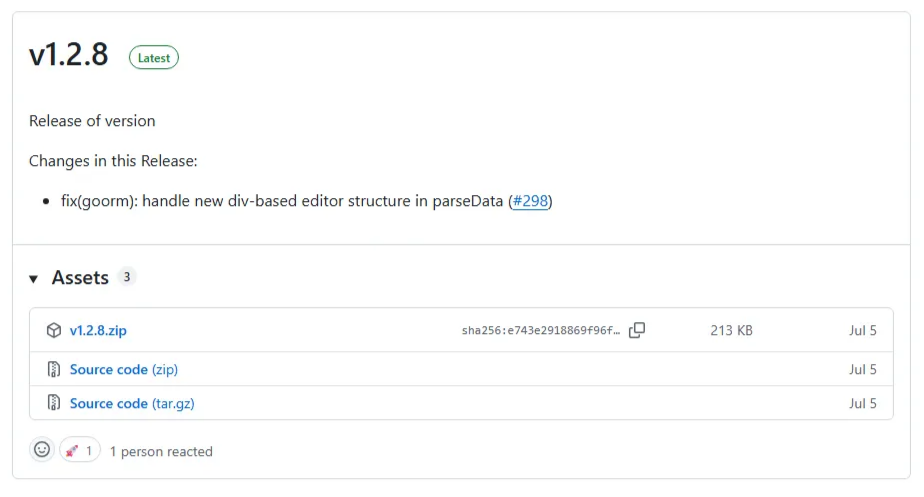 깃허브 레포 정보 우측에서 최신 릴리즈 버전을 클릭하면 위와 같은 화면이 나온다.
압축 해제
다운 받은 압축 파일을 원하는 경로에 압축 해제한다.
경로는 어느 위치에 있어도 관계없다.
나중에 수정한 폴더를 연결해야하니 경로를 알기만 하면 된다.
커스텀 시작
IDE를 사용해 원하는 대로 수정한다.
BaekjoonHub-1.2.8\scripts 이 경로 안에 각 사이트 별 폴더가 나누어져 있다.
작성되어 있는 구조가 조금씩 다르기때문에 하나 하나 변경해줘야한다.
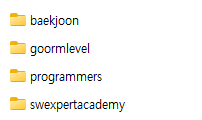
파일명 수정하기
백준
수정할 파일 경로 : BaekjoonHub-1.2.8\scripts\baekjoon\parsing.js
makeDetailMessageAndReadme 메서드 내부 내용 수정
1
2
3
4
5
6
7
8
9
10
11
/*
기존 코드 : 문제이름.언어
(예) Hello World.java
*/
const fileName = `${convertSingleCharToDoubleChar(title)}.${languages[language]}`;

/*
내가 원하는 파일명 구조 : BOJ_문제번호.언어
(예) BOJ_1000.java
*/
const fileName = `BOJ_${problemId}.${languages[language]}`;
프로그래머스
수정할 파일 경로 : BaekjoonHub-1.2.8\scripts\programmers\parsing.js
makeData 메서드 내부 내용 수정
1
2
3
4
5
6
7
8
9
10
11
/*
기존 코드 : 문제이름.언어
(예) Hello World.java
*/
const fileName = `${convertSingleCharToDoubleChar(title)}.${language_extension}`;

/*
내가 원하는 파일명 구조 : PRO_문제번호.언어
(예) PRO_1000.java
*/
const fileName = `PRO_${problemId}.${language_extension}`;
SWEA
수정할 파일 경로 : BaekjoonHub-1.2.8\scripts\swexpertacademy\parsing.js
makeData 메서드 내부 내용 수정
1
2
3
4
5
6
7
8
9
10
11
/*
기존 코드 : 문제이름.언어
(예) Hello World.java
*/
const fileName = `${convertSingleCharToDoubleChar(title)}.${extension}`;

/*
내가 원하는 파일명 구조 : SWEA_문제번호.언어
(예) SWEA_1000.java
*/
const fileName = `SWEA_${problemId}.${extension}`;
프로젝트 경로 수정하기
백준
수정할 파일 경로 : BaekjoonHub-1.2.8\scripts\baekjoon\parsing.js
makeDetailMessageAndReadme 메서드 내부 내용 수정
1
2
3
4
5
6
7
8
9
10
11
12
13
14
15
16
17
18
19
20
21
22
23
24
25
26
27
28
29
/*
기존 코드 : 백준/레벨/문제번호.문제이름/
(예) 백준/Bronze/2557.Hello World/
*/
const directory = await getDirNameByOrgOption(
    `백준/${level.replace(/ .*/, '')}/${problemId}. ${convertSingleCharToDoubleChar(title)}`,
    langVersionRemove(language, null)
);

/*
내가 원하는 구조 : Baekjoon/src/BOJ/레벨/레벨랭크
(예) Baekjoon/src/BOJ/bronze/bronze02
*/
// level 변수 "Bronze II" 분리
const levelParts = level.split(' ');
const tier = levelParts[0].toLowerCase(); // "bronze"
const rankStr = levelParts[1]; // "II"

// 로마 숫자나 아라비아 숫자를 두 자리 숫자로 변환 "II" -> "02"
const romanMap = { 'V': 5, 'IV': 4, 'III': 3, 'II': 2, 'I': 1 };
const rankNum = romanMap[rankStr] || parseInt(rankStr, 10);
const formattedRank = String(rankNum).padStart(2, '0'); // "01", "02"...
const tierWithRank = `${tier}${formattedRank}`;

// 최종 디렉토리 경로 조합
const directory = await getDirNameByOrgOption(
  `Baekjoon/src/BOJ/${tier}/${tierWithRank}`,
  langVersionRemove(language, null)
);
프로그래머스
수정할 파일 경로 : BaekjoonHub-1.2.8\scripts\programmers\parsing.js
makeData 메서드 내부 내용 수정
1
2
3
4
5
6
7
8
9
10
11
12
13
14
15
/*
기존 코드 : 프로그래머스/레벨/문제번호.문제이름/
(예) 프로그래머스/1/2557.Hello World/
*/
const directory = await getDirNameByOrgOption(
  `프로그래머스/${level}/${problemId}. ${convertSingleCharToDoubleChar(title)}`, language
);

/*
내가 원하는 구조 : Programmers/src/PRO/레벨/
(예) Programmers/src/PRO/Lv2/
*/
const directory = await getDirNameByOrgOption(
  `Programmers/src/PRO/Lv${level}`, language
);
SWEA
수정할 파일 경로 : BaekjoonHub-1.2.8\scripts\swexpertacademy\parsing.js
makeData 메서드 내부 내용 수정
1
2
3
4
5
6
7
8
9
10
11
12
13
14
15
/*
기존 코드 : SWEA/레벨/문제번호.문제이름/
(예) SWEA/D1/2557.Hello World/
*/
const directory = await getDirNameByOrgOption(
  `SWEA/${level}/${problemId}. ${convertSingleCharToDoubleChar(title)}`, lang
);

/*
내가 원하는 구조 : SWEA/src/SWEA/레벨/
(예) SWEA/src/SWEA/D1/
*/
const directory = await getDirNameByOrgOption(
  `SWEA/src/SWEA/${level}`, lang
);
커밋 메시지 수정하기
기존 커밋 메세지는 README에 올라가던 내용과 비슷하게 소요 시간, 메모리 등 작성되어 있었다.
수정 내용 자체는 백준, 프로그래머스, SWEA가 동일하다.
하지만, 파일마다 헷갈릴 수도 있으니 다 작성해두었다.
백준
수정할 파일 경로 : BaekjoonHub-1.2.8\scripts\baekjoon\parsing.js
makeDetailMessageAndReadme 메서드 내부 내용 수정
1
2
3
4
5
6
7
8
9
10
11
12
13
14
15
16
/*
기존 커밋 메세지 : [레벨] Title: , Time: , Memory: -BaekjoonHub
(예) [Bronze V] Title: 아스키 코드, Time: 160 ms, Memory: 17620 KB -BaekjoonHub
*/
const message = `[${level}] Title: ${title}, Time: ${runtime} ms, Memory: ${memory} KB`
    + ((isNaN(score)) ? ' ' : `, Score: ${score} point `)
    + `-BaekjoonHub`;

/*
내가 원하는 메세지 : [월/BOJ] 문제번호 문제이름
(예) [OCT/BOJ] 1000 Hello World
*/
const months = ["JAN", "FEB", "MAR", "APR", "MAY", "JUN",
                "JUL", "AUG", "SEP", "OCT", "NOV", "DEC"];
const currentMonth = months[new Date().getMonth()];
const message = `[${currentMonth}/BOJ] ${problemId} ${title}`;
프로그래머스
수정할 파일 경로 : BaekjoonHub-1.2.8\scripts\programmers\parsing.js
makeData 메서드 내부 내용 수정
1
2
3
4
5
6
7
8
9
10
11
12
13
14
/*
기존 커밋 메세지 : [레벨] Title: , Time: , Memory: -BaekjoonHub
(예) [level 2] Title: 고양이와 개는 몇 마리 있을까, Time: 0.00 ms, Memory: -BaekjoonHub
*/
const message = `[${levelWithLv}] Title: ${title}, Time: ${runtime}, Memory: ${memory} -BaekjoonHub`;

/*
내가 원하는 메세지 : [월/PRO] 문제번호 문제이름
(예) [OCT/PRO] 2557 Hello World
*/
const months = ["JAN", "FEB", "MAR", "APR", "MAY", "JUN",
                "JUL", "AUG", "SEP", "OCT", "NOV", "DEC"];
const currentMonth = months[new Date().getMonth()];
const message = `[${currentMonth}/PRO] ${problemId} ${title}`;
SWEA
수정할 파일 경로 : BaekjoonHub-1.2.8\scripts\swexpertacademy\parsing.js
makeData 메서드 내부 내용 수정
1
2
3
4
5
6
7
8
9
10
11
12
13
14
/*
기존 커밋 메세지 : [레벨] Title: , Time: , Memory: -BaekjoonHub
(예) [Unrated] Title: [모의 SW 역량테스트] 수영장, Time: 148ms, Memory: -BaekjoonHub
*/
const message = `[${level}] Title: ${title}, Time: ${runtime}, Memory: ${memory} -BaekjoonHub`;

/*
내가 원하는 메세지 : [월/SWEA] 문제번호 문제이름
(예) [OCT/SWEA] 2557 Hello World
*/
const months = ["JAN", "FEB", "MAR", "APR", "MAY", "JUN",
                "JUL", "AUG", "SEP", "OCT", "NOV", "DEC"];
const currentMonth = months[new Date().getMonth()];
const message = `[${currentMonth}/SWEA] ${problemId} ${title}`;
여기까지가 기본 커스텀이다!
다음 편에서는 Java 코드의 클래스명과 패키지를 자동으로 수정하는 심화 커스텀을 다루겠다.