백준허브(BaekjoonHub) 커스텀 (4) - PR 자동화

이전 편에서 클래스명과 패키지를 자동 수정하는 심화 커스텀을 다뤘다.
이번 편에서는 이 커스텀 시리즈의 메인 이벤트🌸, README 대신 PR(Pull Request)을 자동 생성하는 방법을 다룬다.
README → Pull Request 자동화
기존의 백준허브는 커밋과 동시에 README가 작성되어 올라간다.
하지만 내가 설정한 프로젝트 경로가 하나의 폴더에 하나의 코드 파일만 있는 것이 아닌, 같은 레벨의 다른 코드 파일이 같이 있기 때문에 README가 계속 업데이트되어 수정된다.
따라서, 내 깃허브에서 원래 올리던 방식인 Branch 생성 → PR 작성 → Merge를 유지하기 위해 Branch 생성 → PR 작성의 과정을 자동화 하였다.
※ 기존 README 업로드 방식을 유지하고 싶다면 나와는 다른 디렉토리 경로 (ex, 문제별 폴더)를 지정하길 바란다. 추후 요청이 있다면 이 방식도 업로드 하도록 하겠다!
공통 수정 사항
uploadfunctions.js 수정
수정할 파일 경로 : BaekjoonHub-1.2.8\scripts\각 플랫폼\uploadfunctions.js
기존 upload 함수는 특정 브랜치(main)에 직접 파일을 커밋하는 방식이다.
이 로직을 새 브랜치 생성 → 파일 커밋 → PR 생성 흐름으로 바꿔야 한다.
기존 upload 함수는 삭제하고, 브랜치 생성, PR 생성 함수를 분리하여 작성했다.
1
2
3
4
5
6
7
8
9
10
11
12
13
14
15
16
17
18
19
20
21
22
23
24
25
26
27
28
29
30
31
32
33
34
35
36
/**
 * Github에 풀 리퀘스트 생성하여 문제 풀이 코드 업로드
 * @param {object} bojData - 문제 풀이와 관련된 데이터 객체
 * @param {string} bojData.code - 소스 코드
 * @param {string} bojData.directory - 파일이 저장될 Git 저장소 내의 경로
 * @param {string} bojData.fileName - 파일명
 * @param {string} bojData.message - 커밋 메시지
 * @param {string} bojData.prBody - Pull Request 본문에 들어갈 내용
 * @param {function} cb - 업로드 완료 후 실행될 콜백 함수
 */
async function uploadOneSolveProblemOnGit(bojData, cb) {
  const token = await getToken();
  const hook = await getHook();
  if (isNull(token) || isNull(hook)) {
    console.error('token or hook is null', token, hook);
    return;
  }

  // 새로운 브랜치 생성
  const { newBranchName } = await createBranchAndCommit(
    hook, token, bojData.code,
    bojData.directory, bojData.fileName, bojData.message
  );

  if (newBranchName) {
    // 생성된 브랜치 기반으로 PR 생성
    const pullRequest = await createPullRequestFromBranch(
      hook, token, bojData.prBody, bojData.message, newBranchName
    );
    console.log(`Pull Request가 성공적으로 생성되었습니다: ${pullRequest.html_url}`);

    if (typeof cb === 'function') {
      cb(pullRequest.html_url);
    }
  }
}
브랜치 생성 함수:
1
2
3
4
5
6
7
8
9
10
11
12
13
14
15
16
17
18
19
20
21
22
23
24
25
26
27
28
29
30
31
32
33
34
35
36
37
38
39
40
/**
 * GitHub API를 사용하여 새 브랜치에 파일 커밋
 * @param {string} hook - github repository
 * @param {string} token - github token
 * @param {string} sourceText - 업로드할 소스코드 내용
 * @param {string} directory - 업로드될 파일의 경로
 * @param {string} filename - 업로드할 파일명
 * @param {string} commitMessage - 커밋 메시지 (예: "[OCT/플랫폼] 1000 Helloworld")
 */
async function createBranchAndCommit(hook, token, sourceText, directory, filename, commitMessage) {
  const git = new GitHub(hook, token);
  const stats = await getStats();
  let baseBranch = stats.branches[hook] || await git.getDefaultBranchOnRepo();
  stats.branches[hook] = baseBranch;

  // 베이스 브랜치의 최신 '커밋' SHA와 '트리' SHA 가져옴
  const { refSHA: baseBranchSHA } = await git.getReference(baseBranch);
  const { treeSHA: baseTreeSHA } = await git.getCommit(baseBranchSHA);

  // 커밋 메시지에서 플랫폼 정보 추출
  const platform = commitMessage.substring(
    commitMessage.indexOf('/') + 1, commitMessage.indexOf(']')
  );

  // 새 브랜치 생성
  const newBranchName = `${platform}/problem-${filename.replace(/[^0-9]/g, '')}`;
  const newBranchRef = `refs/heads/${newBranchName}`;
  await git.createReference(newBranchRef, baseBranchSHA);

  // 파일 Blob 생성 및 새 Tree 생성
  const source = await git.createBlob(sourceText, `${directory}/${filename}`);
  const newTreeSHA = await git.createTree(baseTreeSHA, [source]);

  // 새 커밋 생성 및 브랜치 Head 업데이트
  const commitSHA = await git.createCommit(commitMessage, newTreeSHA, baseBranchSHA);
  await git.updateHead(newBranchRef, commitSHA);

  console.log(`성공: '${newBranchName}' 브랜치에 커밋이 완료되었습니다.`);
  return { newBranchName };
}
PR 생성 함수:
1
2
3
4
5
6
7
8
9
10
11
12
13
14
15
16
/**
 * 브랜치 기반으로 Pull Request 생성
 * @param {string} newBranchName - PR을 보낼 브랜치 이름 (e.g., "플랫폼/problem-1001")
 * @returns {Promise<object>} 생성된 Pull Request 객체
 */
async function createPullRequestFromBranch(hook, token, prBody, commitMessage, newBranchName) {
  const git = new GitHub(hook, token);
  const stats = await getStats();
  const baseBranch = stats.branches[hook];

  // PR 제목 생성 => 커밋 메세지를 이미 수정해뒀기 때문에 동일하게 지정
  const prTitle = commitMessage;

  // PR 생성 API 호출
  return git.createPullRequest(prTitle, prBody, newBranchName, baseBranch);
}
GitHub.js 수정
수정할 파일 경로 : BaekjoonHub-1.2.8\scripts\GitHub.js
1. GitHub 클래스 내부에 메서드 추가
1
2
3
4
5
6
7
8
9
10
11
12
13
14
15
16
17
18
19
20
21
22
23
24
25
26
27
28
29
30
31
32
33
34
35
36
37
/*
**특정 커밋을 가리키는 브랜치나 태그 생성하는 함수**
ref: 생성할 브랜치 또는 태그의 전체 경로 이름
sha: 새 브랜치/태그가 가리킬 커밋의 고유 해시 값

(예)
main 브랜치의 최신 커밋을 기반으로 BOJ/problem-15681 새 브랜치 생성
=> ref : refs/heads/BOJ/problem-15681 (브랜치 전체 경로)
   sha : main 브랜치가 현재 가리키고 있는 가장 최신 커밋의 해시 값
※ createReference 호출하기 전, 반드시 main 브랜치 최신 커밋 값 조회하는 과정 먼저 필요
*/
async createReference(ref, sha) {
  log('GitHub createReference', 'ref:', ref, 'sha:', sha);
  return createReference(this.hook, this.token, ref, sha);
}

/*
**GitHub에서 풀 리퀘스트 생성하는 함수**
title: PR 제목
body: PR 상세 설명
head: 변경 사항이 있는 브랜치 (feature/add-button)
base: 변경 사항을 받아들일 브랜치 (main)
*/
async createPullRequest(title, body, head, base) {
  log('GitHub createPullRequest', 'title:', title, 'head:', head, 'base:', base);
  return createPullRequest(this.hook, this.token, title, body, head, base);
}

/*
**특정 커밋의 상세 정보 조회하는 함수**
sha : 조회하고 싶은 커밋의 고유 해시 값
main 브랜치 최신 커밋 값 조회하는 용도로 자주 사용
*/
async getCommit(sha) {
  log('GitHub getCommit', 'sha:', sha);
  return getCommit(this.hook, this.token, sha);
}
2. 구현 함수 추가 (파일 끝에)
위에서 선언된 메서드들의 실제 동작 정의
1
2
3
4
5
6
7
8
9
10
11
12
13
14
15
16
17
18
19
20
21
22
23
24
25
26
27
28
29
30
31
32
33
34
35
36
37
38
39
40
41
42
43
44
45
46
47
48
49
50
51
52
53
54
55
56
/**
 * create a reference
 * @see https://docs.github.com/en/rest/git/refs#create-a-reference
 */
async function createReference(hook, token, ref, sha) {
  return fetch(`https://api.github.com/repos/${hook}/git/refs`, {
    method: 'POST',
    body: JSON.stringify({ ref, sha }),
    headers: {
      Authorization: `token ${token}`,
      Accept: 'application/vnd.github.v3+json',
      'content-type': 'application/json'
    },
  }).then((res) => res.json());
}

/**
 * create a pull request
 * @see https://docs.github.com/en/rest/pulls/pulls#create-a-pull-request
 */
async function createPullRequest(hook, token, title, body, head, base) {
  return fetch(`https://api.github.com/repos/${hook}/pulls`, {
    method: 'POST',
    body: JSON.stringify({ title, head, base, body }),
    headers: {
      Authorization: `token ${token}`,
      Accept: 'application/vnd.github.v3+json',
      'content-type': 'application/json'
    },
  })
    .then((res) => res.json())
    .then((data) => {
      if (data.errors) {
        throw new Error(`PR 생성 실패: ${JSON.stringify(data.errors)}`);
      }
      return data;
    });
}

/**
 * get a commit
 * @see https://docs.github.com/en/rest/git/commits#get-a-commit-object
 */
async function getCommit(hook, token, commit_sha) {
  return fetch(`https://api.github.com/repos/${hook}/git/commits/${commit_sha}`, {
    method: 'GET',
    headers: {
      Authorization: `token ${token}`,
      Accept: 'application/vnd.github.v3+json'
    },
  })
  .then((res) => res.json())
  .then((data) => {
    return { treeSHA: data.tree.sha };
  });
}
util.js 수정 (필수❌ 권장사항)
수정할 파일 경로 : BaekjoonHub-1.2.8\scripts\각 플랫폼\util.js
아이콘 클릭 시 생성된 PR 링크로 이동하도록 수정
1
2
3
4
5
6
7
8
9
10
11
12
13
// 기존 코드
function markUploadedCSS(branches, directory) {
  uploadState.uploading = false;
  const elem = document.getElementById('BaekjoonHub_progress_elem');
  elem.className = 'markuploaded';
  const uploadedUrl = "https://github.com/" +
    Object.keys(branches)[0] + "/tree/" +
    branches[Object.keys(branches)[0]] + "/" + directory;
  elem.addEventListener("click", function() {
    window.location.href = uploadedUrl;
  });
  elem.style.cursor = "pointer";
}
1
2
3
4
5
6
7
8
9
10
11
12
13
// 수정된 코드
function markUploadedCSS(prUrl) {
  uploadState.uploading = false;
  const elem = document.getElementById('BaekjoonHub_progress_elem');
  elem.className = 'markuploaded';

  // 클릭 시 전달받은 prUrl로 이동하도록 변경
  elem.addEventListener("click", function() {
    window.location.href = prUrl;
  });

  elem.style.cursor = "pointer";
}
각 플랫폼별 README → prBody 변환
백준
수정할 파일 경로 : BaekjoonHub-1.2.8\scripts\baekjoon\parsing.js
makeDetailMessageAndReadme 메서드에서 기존 readme 생성 코드를 prBody로 교체
1
2
3
4
5
6
7
8
9
10
11
12
13
14
15
16
17
18
19
20
21
22
23
24
25
26
27
28
29
30
31
// 입력, 출력값에 HTML 태그가 붙어있음. 태그 제거하고 prBody에 추가
const clean_input = problem_input.replace(/<[^>]*>?/gm, '').trim();
const clean_output = problem_output.replace(/<[^>]*>?/gm, '').trim();

const prBody = `
# 🧩 알고리즘 문제 풀이
## 📝 문제 정보
- **플랫폼:** 백준 (BOJ)
- **문제 이름:** ${problemId} ${title}
- **문제 링크:** https://www.acmicpc.net/problem/${problemId}
- **난이도:** ${level}
- **알고리즘 유형:** ${category || "분류 정보 없음"}
- **제출 일자:** ${dateInfo}

## 💡 문제 설명
${problem_description}

### 입력
${clean_input}

### 출력
${clean_output}

## ⏱️ 성능 요약
### 메모리
${memory} KB
### 시간
${runtime} ms

> 출처: Baekjoon Online Judge, https://www.acmicpc.net/problemset
`;
return 문에서 readme → prBody로 변경:
1
2
3
4
5
6
7
return {
    directory,
    fileName,
    message,
    prBody,  // readme 대신 prBody
    code: finalCode
};
프로그래머스
수정할 파일 경로 : BaekjoonHub-1.2.8\scripts\programmers\parsing.js
1
2
3
4
5
6
7
8
9
10
11
12
13
14
15
16
17
18
19
20
21
22
23
24
/*
프로그래머스는 백준처럼 입/출력이 아닌 문제 설명만으로 되어있음
*/
const prBody = `
# 🧩 알고리즘 문제 풀이
## 📝 문제 정보
- **플랫폼:** 프로그래머스
- **문제 이름:** ${problemId} ${title}
- **문제 링크:** ${link}
- **난이도:** Lv.${level}
- **알고리즘 유형:** ${division.replace('/', ' > ')}
- **제출 일자:** ${dateInfo}

## 💡 문제 설명
${problem_description}

## ⏱️ 성능 요약
### 메모리
${memory} KB
### 시간
${runtime} ms

> 출처: 프로그래머스 코딩 테스트 연습, https://school.programmers.co.kr/learn/challenges
`;
SWEA
수정할 파일 경로 : BaekjoonHub-1.2.8\scripts\swexpertacademy\parsing.js
SWEA는 문제 설명과 알고리즘 유형을 자동으로 가져올 수 없다.
1
2
3
4
5
6
7
8
9
10
11
12
13
14
15
16
17
18
19
20
21
22
23
24
25
26
27
28
29
/*
SWEA는 백준, 프로그래머스와 다르게 문제 설명을 가지고 올 수 없다.
따라서 빈칸으로 두고 직접 수정 진행해야한다.
또한 알고리즘 유형도 가지고 올 수 없다.
이를 수정하는 코드는 아래에서 다루도록 하겠다.
*/
const prBody = `
# 🧩 알고리즘 문제 풀이
## 📝 문제 정보
- **플랫폼:** SW Expert Academy (SWEA)
- **문제 이름:** ${problemId} ${title}
- **문제 링크:** ${link}
- **난이도:** ${level}
- **알고리즘 유형:** #알고리즘유형#
- **제출 일자:** ${dateInfo}

## 💡 문제 설명
※ 직접 작성하세요.

## ⏱️ 성능 요약
### 메모리
${memory} KB
### 시간
${runtime} ms
### 코드길이
${length} Bytes

> 출처: SW Expert Academy, https://swexpertacademy.com/main/code/problem/problemList.do
`;
SWEA 알고리즘 유형 프롬프트 입력받기:
수정할 파일 경로 : BaekjoonHub-1.2.8\scripts\swexpertacademy\swexpertacademy.js
알고리즘 유형을 자동으로 가져오지 못하기 때문에 사용자가 입력할 수 있도록 수정했다.
beginUpload 메서드 if (isNotEmpty(bojData)) 블럭 안에 코드 추가:
1
2
3
4
5
6
7
8
9
10
11
12
13
14
15
16
17
18
19
async function beginUpload(bojData) {
  log('bojData', bojData);
  startUpload();
  if (isNotEmpty(bojData)) {
    // 프롬프트로 사용자에게 직접 알고리즘 유형 입력받기
    const userDefinedTags = prompt(
      "이 문제의 알고리즘 분류를 입력하세요.\n(예: DFS, DP, 구현)", ""
    );
    if (userDefinedTags) {
      // prBody 알고리즘 유형을 입력 받은 값으로 교체
      bojData.prBody = bojData.prBody.replace('#알고리즘유형#', userDefinedTags);
    } else {
      // 사용자가 입력 취소하면 기본값으로 변경
      bojData.prBody = bojData.prBody.replace('#알고리즘유형#', '직접 작성하세요');
    }

    // ... 이하 기존 로직 동일
  }
}
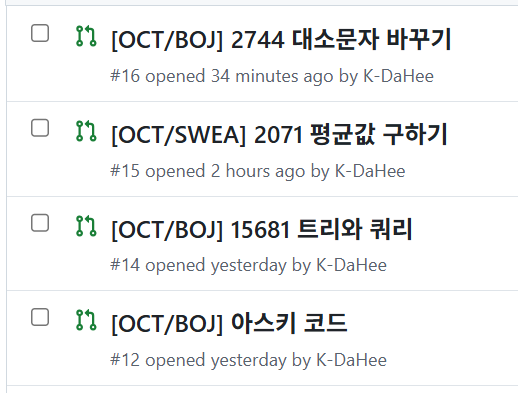
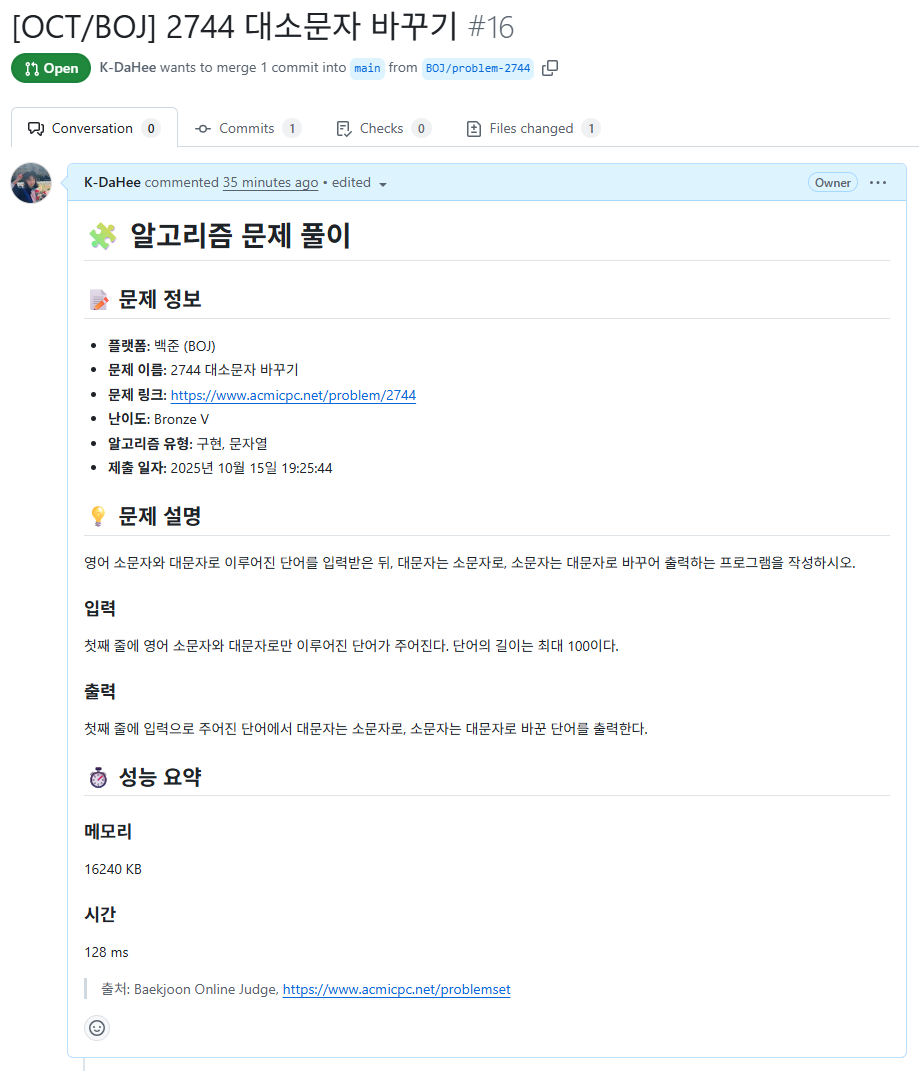
수정을 하고 나면 아래와 같이 PR이 자동으로 생성된다.
다음 편에서는 수정한 코드를 확장 프로그램으로 연결하는 방법을 다루겠다.